System Settings allow administrators to configure global environment variables, application paths, and operational parameters for the entire platform. These settings define how the system handles file uploads, backups, automated alerts, and multi-tenancy configurations.
¶ Overview
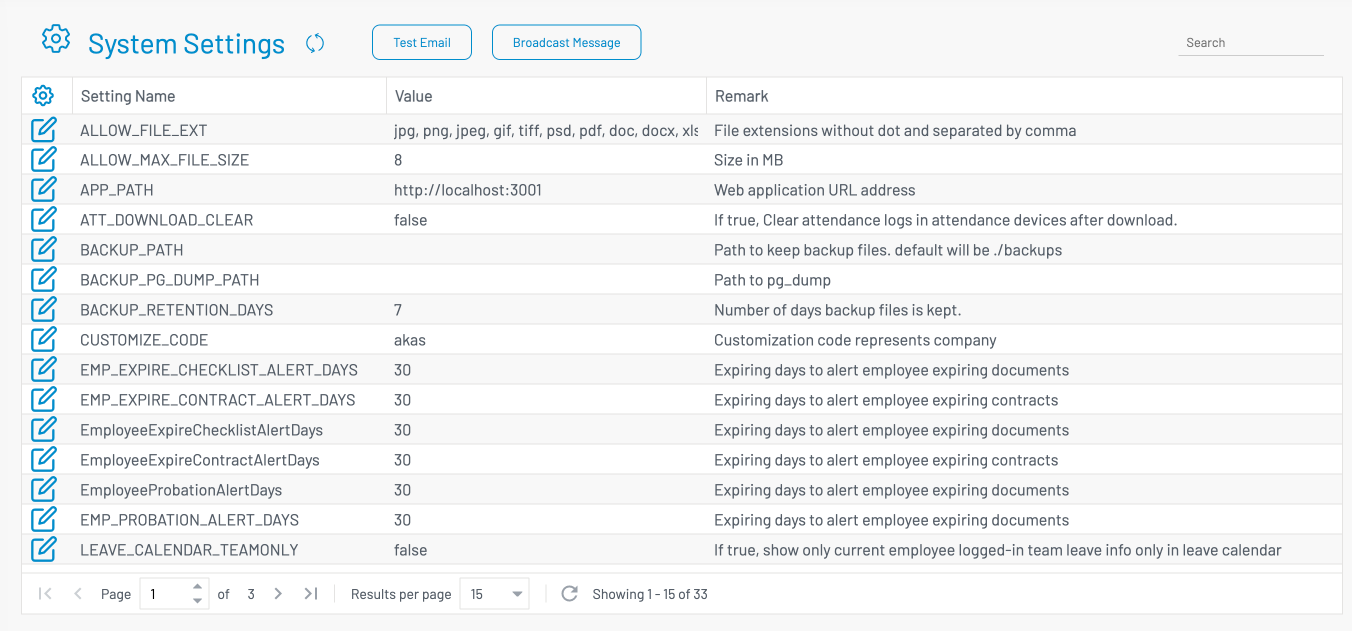
The System Settings interface, as shown in akas-admin-settings, provides a centralized list of configuration keys. Each setting is defined by a unique name, a current value, and a remark explaining its purpose.
¶ Configuration Reference
The following table provides detailed information for each system setting based on the current configuration:
| Setting Name | Description & Remark | Default / Sample Value |
|---|---|---|
| ALLOW_FILE_EXT | List of permitted file extensions. Enter extensions without the dot and separated by commas. | jpg, png, pdf, zip, ... |
| ALLOW_MAX_FILE_SIZE | The maximum allowed file size for uploads, measured in Megabytes (MB). | 8 |
| APP_PATH | The primary web application URL address. | http://localhost:3001 |
| ATT_DOWNLOAD_CLEAR | If set to true, the system will clear attendance logs from the physical devices after a successful download. | false |
| BACKUP_PATH | The directory path where backup files are stored. Defaults to ./backups. |
[blank] |
| BACKUP_PG_DUMP_PATH | The specific directory path to the pg_dump utility for database backups. |
[blank] |
| BACKUP_RETENTION_DAYS | The number of days the system will retain backup files before they are deleted. | 7 |
| CUSTOMIZE_CODE | A unique customization code representing the company (e.g., used for customization identification). | akas |
| EMP_EXPIRE_CHECKLIST_ALERT_DAYS | Threshold in days to trigger alerts for expiring employee documents or checklists. | 30 |
| EMP_EXPIRE_CONTRACT_ALERT_DAYS | Threshold in days to trigger alerts for employee contracts that are about to expire. | 30 |
| EMP_PROBATION_ALERT_DAYS | Threshold in days to trigger alerts for employees approaching the end of their probation period. | 30 |
| LEAVE_CALENDAR_TEAMONLY | If true, users can only see the leave information of members within their own team on the calendar. | false |
| LEAVE_ESS_VALIDATE_DATES | If true, the Employee Self Service (ESS) will prevent users from re-requesting dates that were previously rejected. | false |
| OUTGOING_EMAIL | For testing only. If set, all system-generated emails will be sent to this specific recipient address. Default value: [blank] | savunc@akas.co |
| PAYROLL_HALF_PERIOD | Enables the functionality to run payroll processing twice within a single period. | true |
| PAYROLL_HALF_PERIOD_CUTOFF_DAY | The specific day of the month used as the cutoff between the first and second half of the payroll period. | 15 |
| REPORT_IMG_DPI | The resolution (DPI) for image exports in some reports like invoice, receipt. Valid range: 96 to 1200. | 220 |
| REPORT_IMG_QUALITY | The quality/compression level for image exports in reports. Valid range: 1 to 100. | 60 |
| SMTP_SERVER / PORT | The mail server address and port used for outgoing system notifications. | smtp.gmail.com / 587 |
| SMTP_USER / PASSWORD | The credentials (username and application password) used to authenticate the SMTP server. | akas.notify@gmail.com |
| SMTP_SENDER | The display name that appears as the "Sender" in system-generated emails. | AKAS Cloud |
| SMTP_TIMEOUT | The number of seconds the system will wait before timing out a mail server connection. | 20 |
| SURNAME_FIRST | If true, the system will automatically format partner names with the surname appearing first. | true |
| WIN_AUTH_DOMAIN | The specific domain name used for authenticating Windows/Active Directory users. | akas.co |
¶ How to Modify Settings
Locate the setting in the list using the Search bar at the top right of akas-admin-settings.png.
Click the Edit (Pencil) icon on the left of the row.
Update the Value field according to the instructions in the Remark column.
Save your changes.
Use the Test Email or Broadcast Message buttons at the top of the screen to verify that your configuration is working as expected.