Employee Administration allows HR Personnel to register new and update the existing employee information (employee information, job designation, compensation and benefit, leave entitlement, work schedule, and equipment tracking). Administrator can also easily searches for employees using a keyword.
In AKAS, one employee record has many employment records. This way system tracks all the employment histories of employees from one to another rotation.
To open “Employees” list, click on Personnel left side bar > Employees or click the Employees widget in the dashboard.
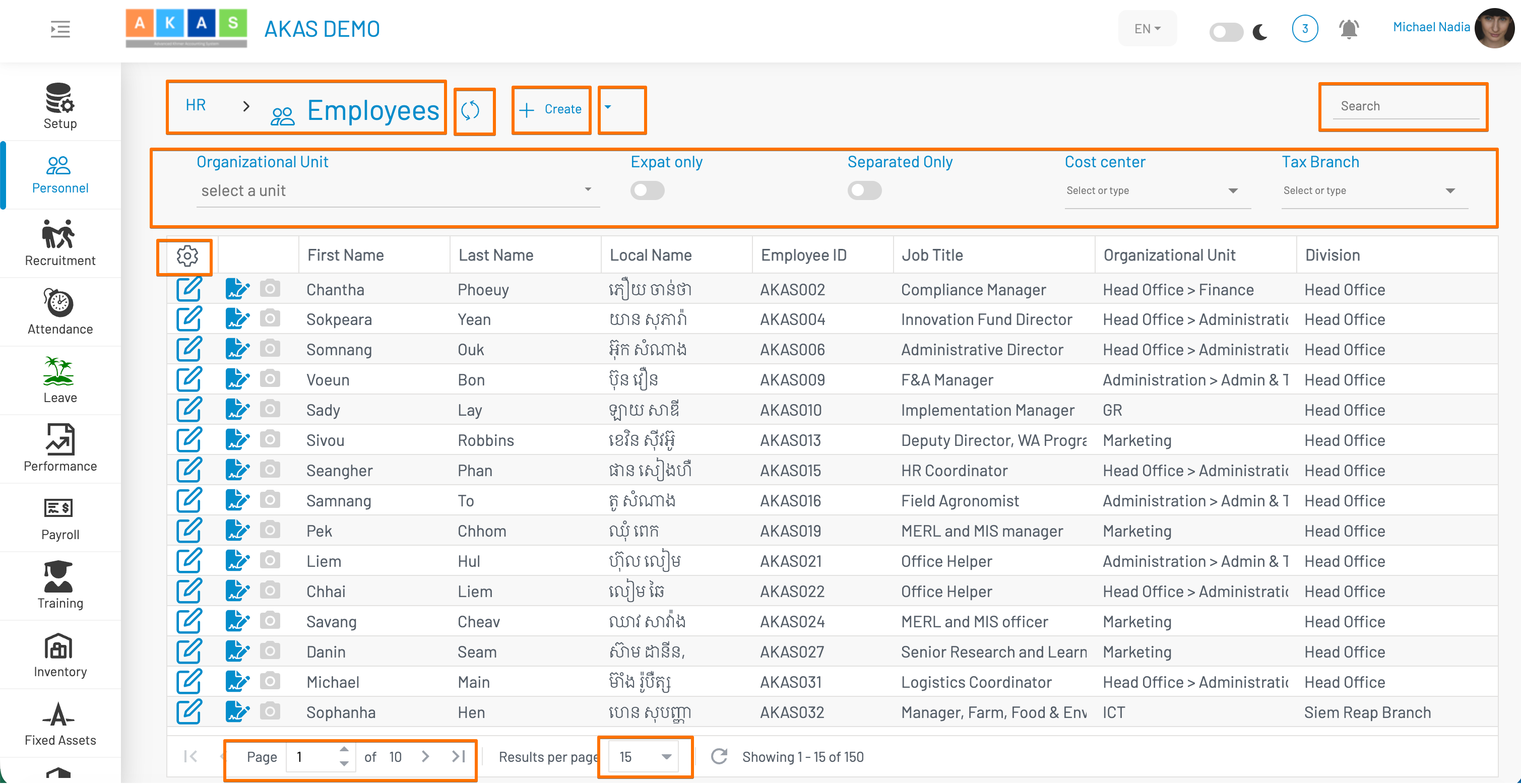
Possible Actions
| Action Number | Description |
| 3 | Add new employee information. We will be describing this in detail in the next section. |
| Edit employee information | |
| 4 | Export employee records into Microsoft Excel Format |
| 5 | Search box search the employee information that match the criteria. This will shrink down the number of records and allowing us to find profile quickly. |
| 6 |
This button allows the filter the list of displayed employee down to any level of organization structure (company-wide, branch, department, section, and team)
|