
Opportunities
Opportunities track sales deals through pipeline stages (for example Prospecting → Qualification → Proposal → Won / Lost).
Navigation: left sidebar → CRM → Opportunities (/crm/opportunities).
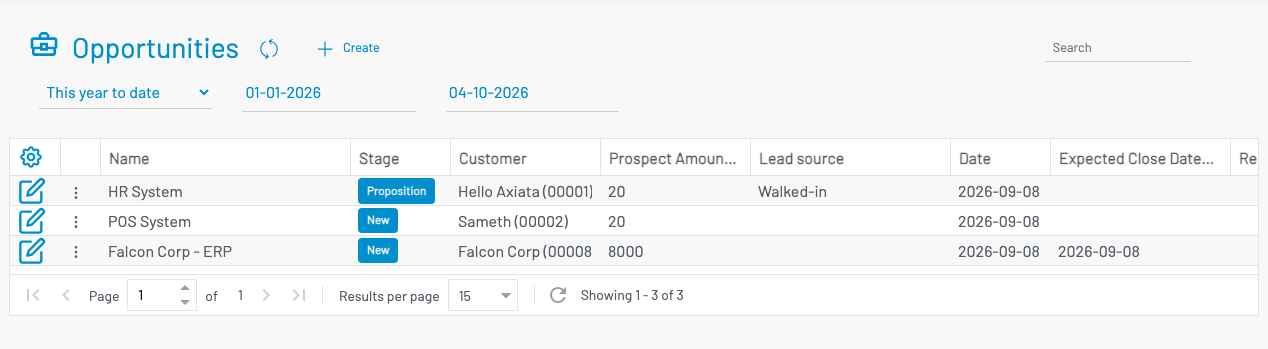
List columns
Section titled “ List columns”| Column | Description |
|---|---|
| Name | Opportunity title. |
| Customer | Linked customer account. |
| Stage | Current pipeline stage. |
| Prospect amount | Estimated deal value. |
| Probability | Win likelihood (%). |
| Expected close date | Target closing date. |
| Account Handler | Assigned sales person. |
Create an opportunity
Section titled “ Create an opportunity”Click + Create.
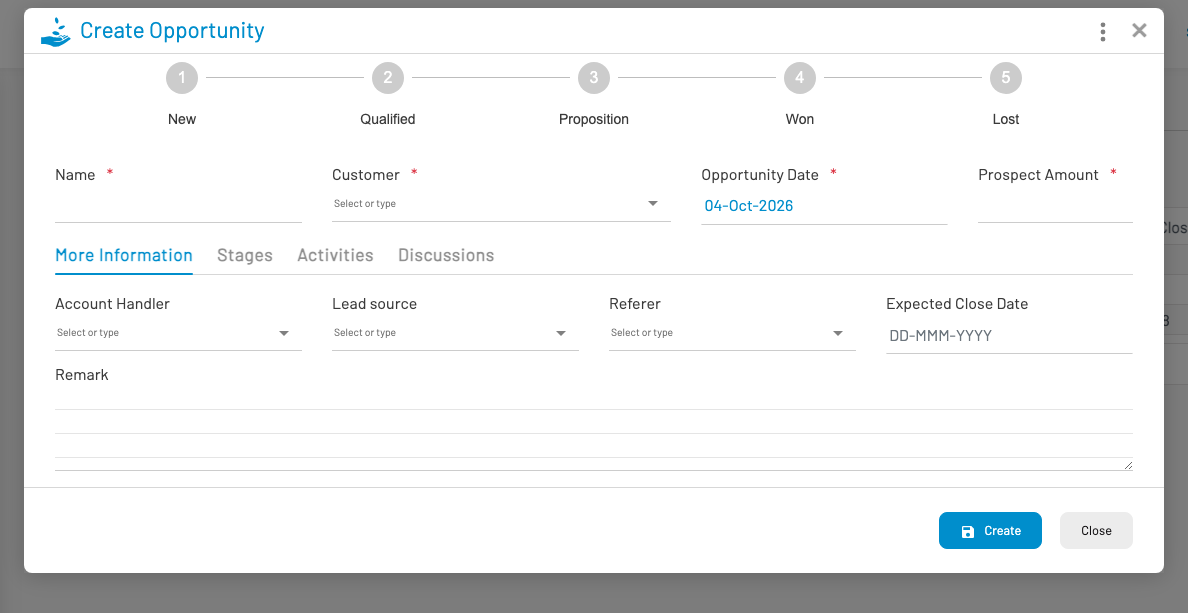
Enter Name, select Customer, set opportunity date and prospect amount. On more information fields set account handler, lead source, referer, and expected close date as needed, then save.
Update stage
Section titled “ Update stage”From the form or list context menu, choose Update stage. Select the new stage and adjust amount/probability if needed. For a Lost stage, enter a reason. Stage history and activities are tracked on the opportunity.
You can also create a linked quotation from an opportunity context menu. For a board view of stages, see Pipeline.